tiny:bit のコードとコントローラアプリの検討
tiny:bit用コードは、Irリモコン用サンプルコード(Ir control V1.5/V2.hex)が何故か動作しないので、Bluetoothを使用したカー・コントローラ・サンプルコード(Bluetooth Remote Control with Ultrasonic V2.hex)を利用。
コントローラ用コードは、Bluetoothを使用した以下3パターンを検討してみる。
- Yahboom Technologyが提供しているAndroidアプリ(BST-Mbit)を使用
- 前方カメラ映像を簡単に表示できるWebアプリ(HTML+JavaScript)で作成
- 独自の前方カメラ映像表示+Bluetoothコントローラ機能を有するAndroidアプリ作成
tiny:bit のコードの書き込み
- http://www.yahboom.net/study/Tiny:bit 画面左の [Bluetooth Remote Control with ultrasonic V2.hex] をクリックしダウンロードする
- tiny:bit に実装された micro:bit のマイクロUSBコネクタとPCをUSB接続
- https://makecode.microbit.org/ を開き、画面右の「読み込む」-> 「ファイルを読み込む…」->「ファイルを選択」で表示されたエクスプローラーで上記でダウンロードした「Tinybit-Bluetooth-Control-V2.hex」を選択し読み込むとプロジェクトがオープンする
- このままのコードだとBluetoothの接続断後の再接続ができないので、「Bluetooth 接続された時」ブロックの「もし connected = 1 ならくりかえし」の処理全部を「ずっと」ブロック部の先頭に移動する
- 「ずっと」ブロック部に元々あった処理部は使用しないが、もし必要なら上記「もし connected = 1 ならくりかえし」の処理内に移動する
- 画面左下の 「ダウンロード」をクリックし micro:bit にコードを書き込む
Androidアプリ(BST-Mbit)を使ってみる
Android端末のPlayストアから下記アプリをダウンロードしインストールする。
https://play.google.com/store/apps/details?id=com.yahboom.mbit&hl=ja
BST-Mbitアプリを起動したら tiny:bitのパワーをオン(右前のスライドスイッチ)し、アプリ画面左上の [Search Bluetooth devices] をクリックして接続する
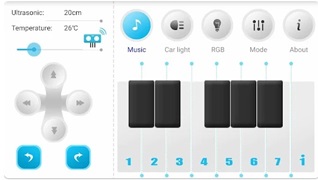
接続後は右図で示されるコントローラで、tiny:bit を様々にコントロールでき、左側のボタンを押すことで、手動で前進/後進/左方向/右方向/左回転/右回転を行える。
ただし、本アプリでは前面カメラを表示させる事はできない。
Webアプリ(HTML+JavaScript)を作成
簡単なカメラ映像とカー・コントローラを合体させたWebアプリで作成してみる。
tiny:bit との接続はWeb Bluetooth API で、全面カメラ映像表示を画像埋め込みタグの <img> で行い、width=320 で解像度変更も可能(ESP32-CAMの FRAMESIZE_VGA 設定やフレームレート等も考慮の事)。
ブラウザでの表示(見た目)は、動作させる機器(PCや携帯)の画面解像度に依存するので css 部を適宜変更してください。
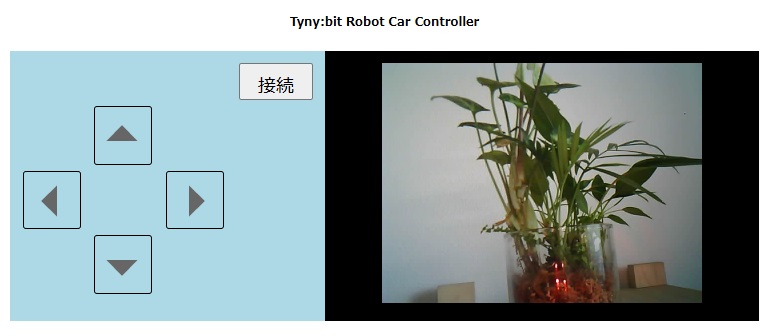
以下にそのサンプルコードを示す。
<!DOCTYPE html>
<meta charset="UTF-8">
<!--
<link rel="stylesheet" href="tri-button.css">
-->
<title>Micro:bit UART 通信</title>
<h1>Tyny:bit Robot Car Controller</h1>
<body>
    <div id="parent">
        <div id="child1">
            <div>
                <button class="big" type="button" id="connect">接続</button>
            </div>
            <div class="icon-button arrow-t" id="up"></div>
            <div class="button-para">
                <div class="icon-button1 arrow-l" id="left"></div>
                <div class="icon-button1 arrow-r" id="right"></div>
            </div>
            <div class="icon-button arrow-b" id="down"></div>
        </div>
        <div id="child2"><img src="http://192.168.11.5:81/stream" width=320></div>
    </div>
</body
<script>
// Web Bluetooth
const UUID_UART_SERVICE = '6e400001-b5a3-f393-e0a9-e50e24dcca9e'
const UUID_TX_CHAR_CHARACTERISTIC = '6e400002-b5a3-f393-e0a9-e50e24dcca9e'
const UUID_RX_CHAR_CHARACTERISTIC = '6e400003-b5a3-f393-e0a9-e50e24dcca9e'
let gatt = null
let tx = null
// 使用機器でイベントを選択する
let event_start = 'mousedown'
let event_end = 'mouseup'
if (navigator.userAgent.match(/iPhone|Android.+Mobile/)) {
event_start = 'touchstart'
event_end = 'touchend'
}
// Bluetooth接続
const update = connected => {
document.getElementById('connect').textContent = connected ? '切断' : '接続'
}
// ボタンデータ送出
const send = text => tx.writeValue(new TextEncoder().encode(text))
// Web Bluetooth実装
document.getElementById('connect').addEventListener('click', e => {
if(!(navigator.bluetooth && navigator.bluetooth.requestDevice)) {
alert('WebBluetooth に未対応のブラウザです。')
return
}
if (document.getElementById('connect').textContent == '接続') {
navigator.bluetooth.requestDevice({
filters: [
{ services: [UUID_UART_SERVICE] },
{ namePrefix: 'BBC micro:bit' }
]
}).then(device => {
gatt = device.gatt
return gatt.connect()
}).then(server =>
server.getPrimaryService(UUID_UART_SERVICE)
).then(service =>
Promise.all([
service.getCharacteristic(UUID_TX_CHAR_CHARACTERISTIC),
service.getCharacteristic(UUID_RX_CHAR_CHARACTERISTIC)])
).then(characteristics => {
tx = characteristics[1]
update(true)
}).catch(function(err) {
alert(err)
})
} else {
gatt.disconnect()
update(false)
}
})
// ボタン操作定義
document.getElementById('up').addEventListener(event_start, e => {send('A#')})
document.getElementById('up').addEventListener(event_end, e => {send('0#')})
document.getElementById('down').addEventListener(event_start, e => {send('B#')})
document.getElementById('down').addEventListener(event_end, e => {send('0#')})
document.getElementById('left').addEventListener(event_start, e => {send('C#')})
document.getElementById('left').addEventListener(event_end, e => {send('0#')})
document.getElementById('right').addEventListener(event_start, e => {send('D#')})
document.getElementById('right').addEventListener(event_end, e => {send('0#')})
</script><style type="text/css">
* {
font-size: 2vmin;
padding: 1vmin;
}
body {
text-align: center;
}
textarea {
vertical-align: middle;
}
.icon-button {
width: 44px;
height: 44px;
border: solid 1px #000;
border-radius: 3px;
margin-left: 77px;
}
.icon-button1 {
width: 44px;
height: 44px;
border: solid 1px #000;
border-radius: 3px;
}
.icon-button:active {
width: 44px;
height: 44px;
border: solid 1px #e42222;
border-radius: 3px;
}
.icon-button1:active {
width: 44px;
height: 44px;
border: solid 1px #e42222;
border-radius: 3px;
}
.arrow-l:before,
.arrow-r:before,
.arrow-b:before,
.arrow-t:before {
position: relative;
display: block;
margin: auto;
top: 50%;
width: 0px;
height: 0px;
border: 11px solid transparent;
border-right-color: #666;
border-top-color: #666;
content: "";
}
.arrow-r:before {
margin-left: 12%;
margin-top: -24%;
-webkit-transform: rotate(45deg);
transform: rotate(45deg);
}
.arrow-b:before {
margin-left: 24%;
margin-top: -36%;
-webkit-transform: rotate(135deg);
transform: rotate(135deg);
}
.arrow-l:before {
margin-left: 36%;
margin-top: -24%;
-webkit-transform: rotate(225deg);
transform: rotate(225deg);
}
.arrow-t:before {
margin-left: 24%;
margin-top: -12%;
-webkit-transform: rotate(315deg);
transform: rotate(315deg);
}
.button-para {
display: grid;
grid-auto-columns: 0fr;
grid-auto-flow: column;
gap: 85px;
width: fit-content;
}
button.big {
display: block;
margin-left: auto;
width: 4em;
height: 2em;
font-size: 150%;
}
#child1 {
background-color: lightblue;
}
#child2 {
background-color: rgb(0, 0, 0);
}
@media (min-width: 600px) {
#parent {
display: flex;
}
#child1 {
flex-grow: 1;
}
#child2 {
flex-grow: 1;
}
}
</style>
コメント